
Sessions
A session is the most fundamental concept in Lody. You start a new session from the home page composer. This is equivalent to one conversation in the Claude Code / Codex CLI.
Before starting, you can configure the session through menus around the composer:
- repository and branch
- agent config
- model
- permission scope
Lody launches the session based on these selections.
Session List
In the left sidebar, Lody shows all repositories with started sessions and all conversations in chronological order.
Each session includes an AI-generated semantic title, current branch name and status, and line-level file changes compared with the base branch, making it easy to scan.
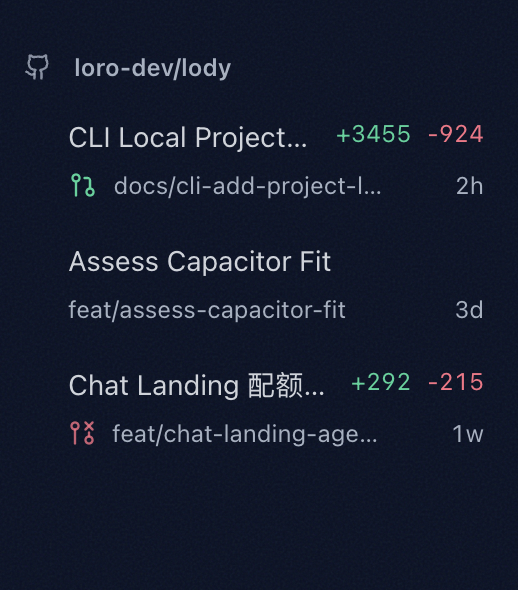
Hover a repository row and use the drag handle on the right to reorder repository groups.
Archive Sessions
Hover a session in the list (or tap it on mobile) to reveal the archive button at the bottom-right. Click it to archive the session.
Archived sessions are moved into the archive list but are not truly deleted. Conversation content and workspace state are preserved. Archiving is only for cleaning up your active list. To permanently delete a session and free worktree disk space, use Delete Session.
Unarchive Sessions
At the bottom-right of the left sidebar, click the archive-list button to open archived sessions. Click the restore button next to a session to move it back to the active list and continue chatting at any time.

Delete Sessions
At the bottom-right of the left sidebar, click the archive-list button to open archived sessions. Click the delete button next to a session to permanently remove it and free disk space on the CLI machine.

Bulk Restore and Delete
Hover a conversation and click the checkbox at the front to enter multi-select mode. Then click more actions for batch selection, and choose bulk restore or delete from the top-right controls.